
At least, it will seem simple if you know the answer, which many of you probably will. I'm a novice, as you will see.
THE QUESTION: If I have a modem/router in Bridge mode, can I still make use of a switch?
THE DETAILS: I've got a Comcast (my only choice) modem/router and I recently added a Google OnHub router to make wi-fi better. I have read that there are plenty of superior routers in the same class and that's fine. I'm very happy w/ the OnHub.
Per the OnHub's instructions, I have set the Comcast thing into Bridge mode, which I think means it is relegated to modem duties, leaving the OnHub to do the routing.
There are about six devices in the network, though there are rarely more than two operating at the same time. Computers, mobile devices, wireless printer.
In the future, I may want to move things around. I may also add some things, like storage, directly to the modem (or router?) via ethernet cables. For now, I will wait to see what Google comes up with, because the USB and certain other things on the OnHub router are not even functional yet. When they are, it seems like that might be the way to go.
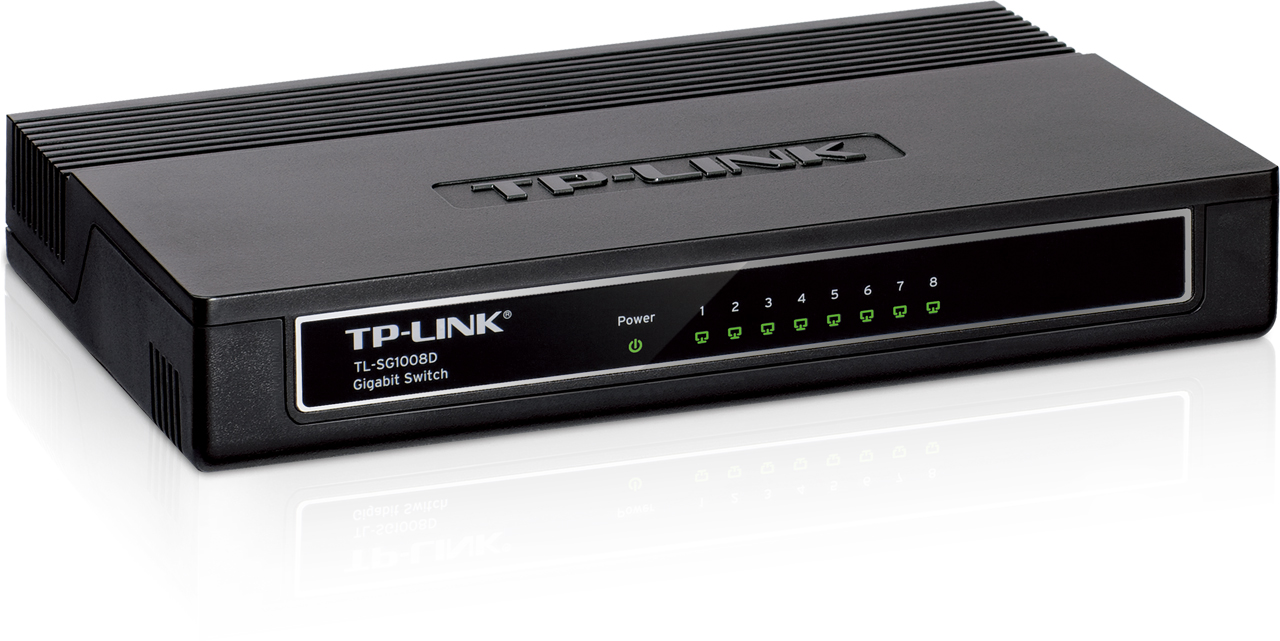
BUT, I'm still curious. If I wanted to add a simple switch like this to my set-up, there would be no point in adding it to the Comcast device, correct?
Unless it's just another computer that needs Internet, I need to connect it to the OnHub router, right?
That is, if I want other devices to talk to it, I need to connect it to the router, or disable Bridge mode?
Simple Router Question
Moderator: Global Moderator
-
Libertarian666
- Executive Member

- Posts: 5994
- Joined: Wed Dec 31, 1969 6:00 pm
Re: Simple Router Question
I have a router. I also have a switch (the same model as yours, apparently!) to which most of my devices are connected, because my router can only handle 100M speeds, not 1G. Thus, copying data among these devices is a lot faster when they are connected to the switch instead of directly to the router.
All you should need to do is connect the switch to the OnHub router, leaving that router connected to the Comcast modem. Then connect all the other devices to the switch.
All you should need to do is connect the switch to the OnHub router, leaving that router connected to the Comcast modem. Then connect all the other devices to the switch.
-
Pointedstick

- Executive Member
- Posts: 8886
- Joined: Tue Apr 17, 2012 9:21 pm
- Contact:
Re: Simple Router Question
Correct.
Putting a modemrouter into bridge mode disables its router functionality, so it only outputs one internet connection. You're using the Google OnHub to turn that single wired connection into many WiFi connections. Most routers also have a few ethernet ports, but sine the OnHub only has one, you can plug a cheap switch into it exactly like you're wondering if you want to plug multiple things into it with ethernet. Once you have a router, you plug stuff into the router, not the modem.
I sort of worry that the OnHub will morph into a terminator.
Putting a modemrouter into bridge mode disables its router functionality, so it only outputs one internet connection. You're using the Google OnHub to turn that single wired connection into many WiFi connections. Most routers also have a few ethernet ports, but sine the OnHub only has one, you can plug a cheap switch into it exactly like you're wondering if you want to plug multiple things into it with ethernet. Once you have a router, you plug stuff into the router, not the modem.
I sort of worry that the OnHub will morph into a terminator.
Human behavior is economic behavior. The particulars may vary, but competition for limited resources remains a constant.
- CEO Nwabudike Morgan
- CEO Nwabudike Morgan
-
dualstow

- Executive Member
- Posts: 15769
- Joined: Wed Oct 27, 2010 10:18 am
- Location: foot of Mt Belzoni
- Contact:
Re: Simple Router Question
Thank you, tech. I thought that outcome was too good to be true!
I don't actually own the switch. But that is the one I will pick up if I buy one.
I don't actually own the switch. But that is the one I will pick up if I buy one.
I was just reading through more of the questions on the amazon page of that switch, and someone gave an answer to a question that supports your statement.(Libertarian666) Thus, copying data among these devices is a lot faster when they are connected to the switch instead of directly to the router.
The bottleneck is likely on the Internet side
...
Yes, it will go gigabit between the ports if the devices connected are capable.
.
-
dualstow
- Executive Member
- Posts: 15769
- Joined: Wed Oct 27, 2010 10:18 am
- Location: foot of Mt Belzoni
- Contact:
Re: Simple Router Question
Yeah, I will most likely wait until the different jacks on the OnHub are activated by Google, and then plug the switch into the OnHub.Pointedstick wrote: Once you have a router, you plug stuff into the router, not the modem.
Like the TV set on South Park!I sort of worry that the OnHub will morph into a terminator.
.
-
dualstow
- Executive Member
- Posts: 15769
- Joined: Wed Oct 27, 2010 10:18 am
- Location: foot of Mt Belzoni
- Contact:
Re: Simple Router Question
I see the official answer -
https://support.google.com/onhub/answer ... 1967612833
I'm embarrassed to say I got some kind of webmaster certificate 15 years ago. It's not just that the info is out of date. It's that I don't remember anything.
https://support.google.com/onhub/answer ... 1967612833
Apparently the LAN jack works already.Connect a switch to OnHub
Plug an Ethernet cable into one of the switch’s LAN ports. Plug the other end into your OnHub’s LAN port (next to the icon).
I'm embarrassed to say I got some kind of webmaster certificate 15 years ago. It's not just that the info is out of date. It's that I don't remember anything.
.